

Fallen
Moderating
- Joined
- Jun 27, 2026
- Messages
- 16
- Reaction score
- 5

Hello everyone! Today we are sharing our new 100% FREE resource with the community: Forge Car Wash.
Take your server’s car washes to the next level. This script is a complete system that combines advanced business management with interactive job mechanics. You can let NPC employees handle the work automatically, or allow real players to earn money by cleaning vehicles manually.
Features
- Full Business Management: Modern boss panel with sales history, employee management, supply control, and a live activity feed.
- Smart NPC Employees: Hire up to 3 NPC workers per location. They feature a leveling system, earn salaries, and have a happiness meter that depends on your management.
- Realistic Pressure Washer Minigame: Players can go on duty to clean cars. Vehicles are divided into “zones” and dirt is removed in real-time using a custom pressure washer prop and water effects.
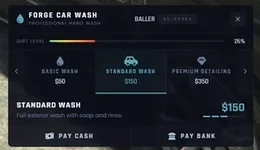
- 3 Wash Tiers: Basic (40% clean), Standard (75% clean), and Premium (100% clean + repair).
- Supply System: Your NPCs need supplies to work. Purchase stock through the boss menu, or your workers will stop working.
- Cinematic Cameras: Smooth and dynamic camera angles during the automated NPC wash sequence.
- Plug-and-Play: Auto-detects ESX and QB-Core. No tedious setups. Compatible with ox_target or classic 3D markers.


Preview & Download
Watch the Preview here:
Get it here for FREE:
-
Code is accessible No (config and UI yes) Subscription-based No Lines (approximately) +2000 Requirements QB, ESX or QBOX / ox_lib Support Yes
